Showing posts with label convert video. Show all posts

Monday, December 8, 2008

Clone2Go Bulk Converts Video Formats


Source from http://lifehacker.com/5103806/clone2go-bulk-converts-video-formats

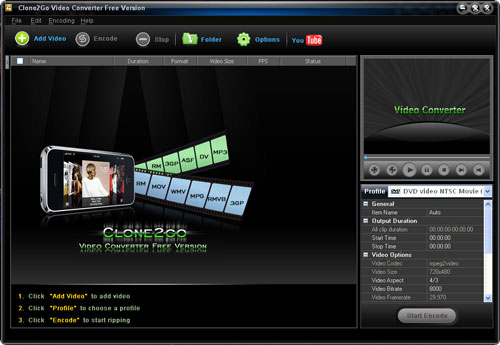
Windows only: Clone2Go(http://www.clone2go.com/products/freevideo.php) is an easy to use bulk video converter. It supports a wide variety of input formats such as: WMV, FLV, MPEG4, AVI, and 3GP. You can output to an equally as wide variety of formats to ensure you can transfer your media to portable devices like the iPod, Zune, and mobile phones. Clone2Go supports batch processing so you can load it up let it convert unattended. The encoding rate is rather snappy and the GUI is easy to navigate. An added bonus if you find yourself frequently snagging video files for your portable devices off of YouTube and Google Video, is integration with the sites. There is a pro version of the software that allows you to save custom profiles— the free version allows you to customize your settings as much as you like but not save the custom conversion tweaks you make— and gets rid of the nag screen that pops up after you're done converting. Still the presets in the free version are plentiful, you can tweak them if you need to just without saving, and the nag screen is tolerable in exchange for a free and easy to use converter. For other video encoding alternatives, check out the Five Best Media Converters.

Wednesday, October 22, 2008

Clone2Go releases super DVD ripper-video converter and YouTube downloader features supported

Clone2Go DVD Ripper(http://www.clone2go.com/products/dvdtoripper.php) is the most powerful software specially designed for ripping DVD's and converting video files to all popular video/audio formats for playback on all popular entertainment devices such as iPod touch, iPod nano, iPod classic, iPhone, PSP, Apple TV, Zune, Creative Zen, BlackBerry, mobile phone and so on.

With the DVD ripping feature, Clone2Go DVD Ripper can rip all kinds of DVD movies to all popular video formats such as MPEG, AVI, 3GP, WMV and FLV and audio formats such as MP3, WAV, WMA, OGG, AMR and MP2. As a video converter, it can convert almost all video formats including MPEG, WMV, RM, RMVB, MOV, VOB, DivX, XviD, AVI to MPEG-4 or MPEG movie formats for MP4 player, iPod, smart phone or any other video/audio formats for various media players.

Clone2Go DVD Ripper can help to download FLV videos from YouTube website and then convert FLV to any other video/audio format you need.


Key features of Clone2Go DVD Ripper:

1. Clone2Go DVD Ripper is equipped with a user-friendly interface and an easy-to-use style, bringing convenience to users.
2. Supported input media formats: DVD, MOV, WMV, FLV, MPEG-4, MPG, RM, RMVB, AVI, DivX, XviD, VOB, ASF, DV, 3GP, M1V and M2V.
3. Supported output media formats:
video: AVI, WMV, MP4, 3GP, FLV, MPG, MPEG4, MPEG and MPEG-II;
Audio: MP3, WAV, OGG, AMR and MP2.
4. Download FLV videos from YouTube website and convert FLV videos.
5. Rip DVD, convert video(including online YouTube video) to the specific video/audio format for iPod, iPhone, Apple TV, PSP, PS3, Zune, Creative Zen, mobile phone, etc.
6. Support video source from DV video.
7. Change video and audio properties independently, customize output video frame size, split files into smaller parts, etc.
8. Extract audio from DVD movies or video files.
9. The professional package software that bundles DVD ripper, video converter and YouTube downloader/converter rather than a simple DVD ripper.

Availability and Price

Clone2Go DVD Ripper is available at http://www.clone2go.com/products/dvdtoripper.php. You can free download Clone2Go DVD Ripper from http://www.clone2go.com/down/dvd-ripper-setup.exe for a try. And it costs USD39.95 to register the full version.

If you have questions concerning Clone2Go DVD Ripper, please feel free to contact us via clone2go.support@gmail.com . We are dedicated to providing you with the best product.

Tuesday, October 21, 2008

How to Enjoy DVD/Video/YouTube/iTunes/WMA on Mobile Phone

Apart from the basic functions of calling and SMS, a mobile phone is also a pretty good multimedia player, which enables you to play games, enjoy videos and music and browse images etc., so long as the media is accepted by the specific phone. In order to know which formats the specific phone accepts, you can make a simple Google search or visit the tech specs page in the official website of the phone.

If you want to enjoy DVD movies on your mobile phone, you have to get a DVD ripping program to help you rip the DVD movies to the format (MP4, 3GP, AVI, etc.) supported by your phone. Here, I'd recommend using Clone2Go DVD Ripper, which I have been using for a long time. The main reason I am fond of it is that, apart from the DVD ripping feature, it also serves as an all-in-one video converter. Plus, it allows you to download videos from YouTube.com and convert YouTube FLV videos to any other video format you need. So this DVD ripper can help you rip DVD movies to mobile phone video, convert any video to mobile phone video and even convert online YouTube video for your mobile phone. However, it is not free. It does cost you USD39.95 to register the full version. And there really exist many counterpart freewares to do so. Yet, it is well worth a try if you want to avoid the trouble of getting these programs from time to time. Here is the screenshot I captured from Clone2Go DVD Ripper.


Personally speaking, due to the narrow screen, I don't like playing games or videos with my mobile phone. However, I do enjoy listening to all kinds of music with my mobile phone. If you have downloaded songs from a CD or a shareware site like Limewire, you can easily put them on your mobile phone. However, any song you purchased directly from iTunes store will not play on your phone, due that it is encrypted by DRM. I have found the easiest way is to burn the music to an audio CD and then rip it back to Windows Media Player or a similar program as an MP3. And Wordpress has a little tutorial that shows how to get MP3 files from iTunes DRM protected AAC (M4P) music in two different ways. One is to burn an audio CD in iTunes and then rip the CD back to MP3 as I mentioned. The other is to use a program called TuneClone, a piece of software that works extremely great for converting a large collection of DRM protected iTunes music to MP3, with the metadata of the music well preserved at the same time. Together with Windows Media Player, TuneClone can also help you get DRM protected WMA (Windows Media Audio) music converted to MP3 for your mobile phone.

At last you can get a microSD card, with which you can transfer the videos and music to your phone to enjoy them wherever you go. Of course, you can also get some software to help you transfer the output files from your PC to your phone. Many of them are available online.

Thursday, August 28, 2008

Clone2go Free Video Converter Released

Clone2go Free Video Converter is a totally free video converter program for converting video files in various formats. The supporting input formats include WMV, FLV, MPEG-4, MPG, RM, RMVB, AVI, 3GP, etc. The output formats include MP4, AVI, WMV, FLV, etc.

With so many input and output formats, Clone2go Free Video Converter can easily convert video files into the correct one for your portable devices such as MP4 player, iPod touch, iPod nano, iPod classic, iPhone 3G, Sony PSP, Microsoft Zune, Mobile Phone (e.g. Nokia N-Series), Pocket PC and smart phone, making your videos and movies portable.

Clone2go Free Video Converter brings convenience in batch file conversion which just needs simple steps. You can download FLV videos from YouTube.com or Google Video and convert FLV to other formats using this software.


Key features of Clone2go Free Video Converter(http://www.clone2go.com/products/freevideo.php ):

1. Very user-friendly interface and easy-to-use style.

2. Convert video files of different formats. The input format includes: WMV, FLV, MPEG-4, MPG, RM, RMVB, AVI, 3GP, etc. The output format includes: MP4, AVI, WMV, FLV, etc.

3. Support a wide variety of mobile devices like iPod, iPhone, PSP, Zune, Mobile Phone, Pocket PC, etc.

4. Download FLV videos from YouTube.com or Google Video and convert FLV to other formats using this software.

5. Extract audio tracks from video files and movies to convert video to audio.

6. Also serves as a powerful audio converter.

7. Customize output video frame size.

8. Split video/audio files into smaller clips.

Clone2go Free Video Converter is free available at http://www.clone2go.com/down/video-converter-free-setup.exe .

If you have questions concerning Clone2go Free Video Converter, please feel free to contact us via support@clone2go.com . We are dedicated to providing you with the best product.